 FreePSDHero
Salon Facebook Cover PSD Template
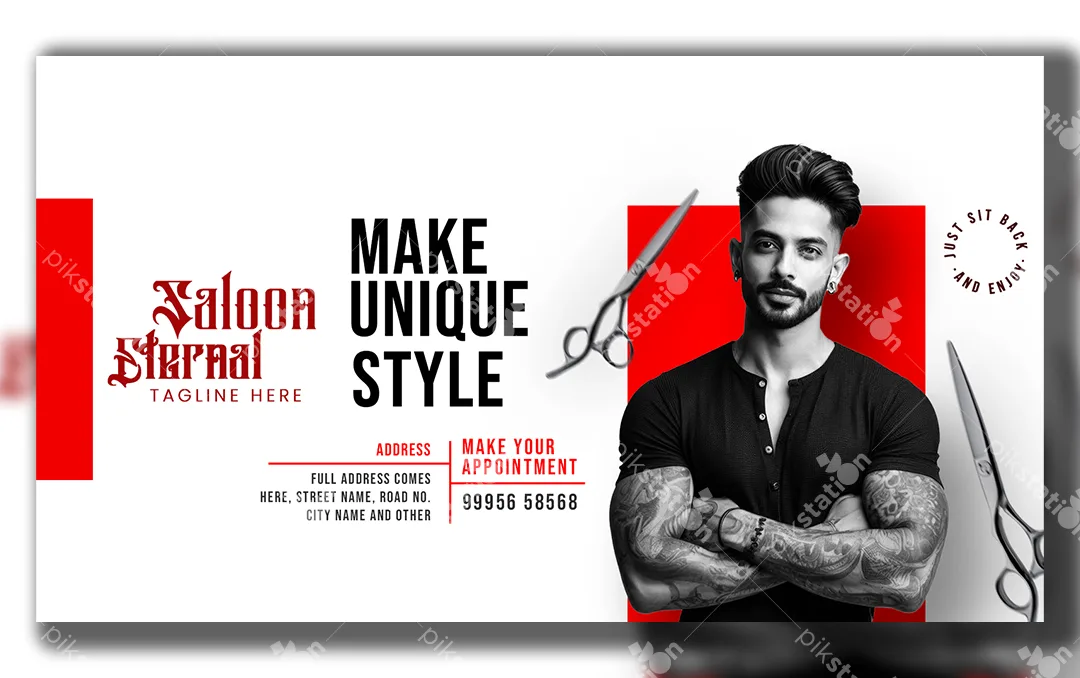
A salon page sells a look, so the cover should feel sharp and confident. This free PSD uses a strong black, white and red palette: a black-and-white model photo in front of a red block, silver scissors, and a tall, condensed headline that reads "Make Unique Style".
What's in the design
- A decorative blackletter salon name ("Saloon Eternal" in the demo) with a tagline below
- A large three-line headline in condensed capitals
- An address block and a "Make your appointment" phone number
- A round "Just sit back and enjoy" badge and scissors graphics
Who it suits
Men's salons, barber shops and grooming studios. The red can be changed to your brand colour in a few clicks, so it also suits a unisex salon or a beauty parlour if you change the photo.
How to customise it
- Unzip the download and open the PSD in Adobe Photoshop.
- Type your salon name over the demo name. If the decorative font is missing, any bold serif or script font also looks good here.
- Replace the address and appointment number.
- Swap the model photo for one of your own haircuts or your team. Your own work sells better than a stock model.
- To change the colour, select the red shapes and use a new fill colour or a Hue/Saturation adjustment.
Tip: Make sure the phone number on the cover matches the "Call now" button on your page, so customers don't get two different numbers.
File details
- File type: Layered PSD (Adobe Photoshop)
- Canvas size: 1600 × 900 px, RGB
- Download size: 4.5 MB (ZIP)
- Includes: PSD file and a PNG export
Note: Model photos are for preview. Use photos you have the rights to when you publish your cover.
Download this PSD
Free download. Layered Photoshop file. Please read the license before you use it.
Download nowGet new freebies
New free design files, shared on our channels.
TelegramWhatsApp