 FreePSDHero
Social Media Marketing PSD Template - Instagram on Armchair Post
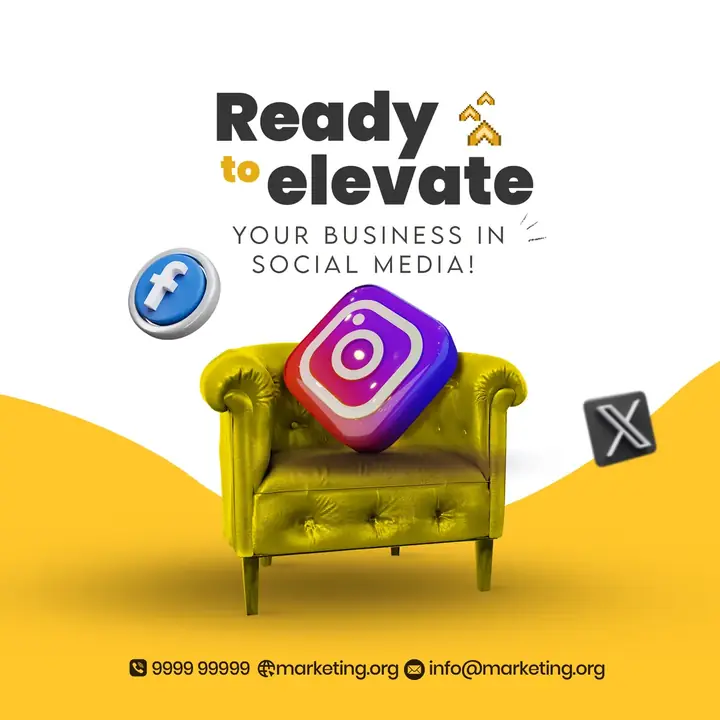
A yellow and white post with a yellow armchair holding a 3D Instagram icon and Facebook and X icons around. The text reads 'Ready to elevate your business in social media'.
What's in the design
- Armchair with Instagram icon
- Social icons
- Headline
- Contact line
Who it suits
Small businesses, shops, service providers and agencies that want a clean, ready post.
How to customise it
- Extract the RAR file and open the PSD in Adobe Photoshop.
- Replace the logo, name and contact details.
- Edit the headline and text for your business.
- Swap the photo for your own if needed.
- Export as JPG at 1080 px.
Important: this design shows other companies' products or logos. Replace them with photos of products you actually sell, and don't use a brand's name or logo in your ads unless you sell it or have permission.
File details
- File type: Layered PSD (Adobe Photoshop), packed as RAR
- Preview size: 2000 × 2000 px
- Download size: 67 MB
- Includes: PSD file and a preview image
Download this PSD
Free download. Layered Photoshop file. Please read the license before you use it.
Download now (67 MB)Prompt kit for this template
Copy these into ChatGPT, Gemini, Claude, Midjourney or Adobe Firefly to make matching backgrounds and text for your own version.
AI image prompts for backgrounds and variations
Text prompt to write your headline and offer
Ready captions for Instagram, Facebook and WhatsApp
Questions
How do I open the RAR file?
Use a free tool such as 7-Zip or WinRAR on Windows, or The Unarchiver on Mac. Then open the PSD in Adobe Photoshop.
Get new freebies
New free design files, shared on our channels.
TelegramWhatsApp