 FreePSDHero
Maha Shivaratri PSD Template with Lord Shiva and Two Tooth Characters
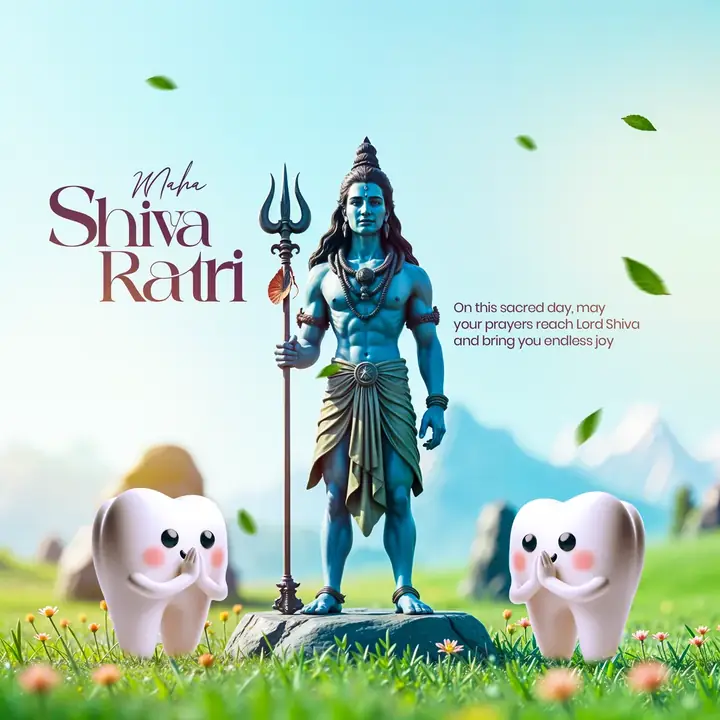
A blue Lord Shiva with a trishul stands on a rock in a meadow with two cartoon teeth beside him. The headline reads Maha Shivaratri.
What's in the design
- Shiva figure
- Two tooth characters
- Meadow background
- Wish text
Who it suits
Dental clinics and dentists who want a friendly festival or special-day greeting that still feels on-brand.
How to customise it
- Extract the RAR file and open the PSD in Adobe Photoshop.
- Edit the greeting and the wish.
- Replace the website and social handles with your clinic's.
- Add your clinic logo and phone number.
- Export as JPG at 1080 px for Instagram and WhatsApp.
File details
- File type: Layered PSD (Adobe Photoshop), packed as RAR
- Preview size: 2048 × 2048 px
- Download size: 45 MB
- Includes: PSD file and a preview image
Download this PSD
Free download. Layered Photoshop file. Please read the license before you use it.
Download now (45 MB)Prompt kit for this template
Copy these into ChatGPT, Gemini, Claude, Midjourney or Adobe Firefly to make matching backgrounds and text for your own version.
AI image prompts for backgrounds and variations
Main imageLord Shiva with trishul on rock in flower meadow with two cartoon teeth, no text, no logos
Background ideaCute 3D cartoon tooth character celebrating a festival with decorations, soft bokeh background, no text
Text prompt to write your headline and offer
Write 5 short festival wishes (max 12 words) from a dental clinic called [name], each with a gentle smile or oral-care twist, plus one caption with 5 hashtags.
Ready captions for Instagram, Facebook and WhatsApp
EnglishOn this sacred day, may your prayers reach Lord Shiva and bring you endless joy.
Hindi🎉 आपको और आपके परिवार को त्योहार की हार्दिक शुभकामनाएं! मुस्कुराते रहिए 😁 — [क्लिनिक]
Questions
How do I open the RAR file?
Use a free tool such as 7-Zip or WinRAR on Windows, or The Unarchiver on Mac. Then open the PSD in Adobe Photoshop.
Get new freebies
New free design files, shared on our channels.
TelegramWhatsApp