 FreePSDHero
Logistics & Shipping Company PSD Template - Courier with Parcels Post

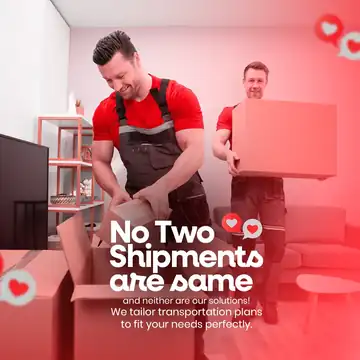
A red post with a courier in a red shirt and cap carrying two boxes and the text 'Wherever you go, our wide network ensures timely pickups and deliveries'.
What's in the design
- Courier with parcels
- Headline
- Network badge
- Footer with contact details
Who it suits
Logistics companies, transporters, packers and movers, courier and freight services.
How to customise it
- Extract the RAR file and open the PSD in Adobe Photoshop.
- Replace the logo, company name and phone number.
- Edit the headline and list of services.
- Swap the truck or delivery-person photo for your own.
- Export as JPG at 1080 px.
File details
- File type: Layered PSD (Adobe Photoshop), packed as RAR
- Preview size: 1300 × 1300 px
- Download size: 5 MB
- Includes: PSD file and a preview image
Download this PSD
Free download. Layered Photoshop file. Please read the license before you use it.
Download now (5 MB)Prompt kit for this template
Copy these into ChatGPT, Gemini, Claude, Midjourney or Adobe Firefly to make matching backgrounds and text for your own version.
AI image prompts for backgrounds and variations
Main imageSmiling courier in a red shirt carrying two cardboard boxes on red, no text, no logos
Background ideaRed cargo truck on an open road with a soft city skyline, empty space for text, no text, no logos
Text prompt to write your headline and offer
Write 5 short headlines (max 6 words) and a 40-word caption for a logistics company called [name] in [city] offering freight and delivery services.
Ready captions for Instagram, Facebook and WhatsApp
EnglishTimely pickups and deliveries so you can focus on your business.
Hindi🚚 सुरक्षित और समय पर डिलीवरी! [कंपनी] से संपर्क करें 📞[नंबर]
Questions
How do I open the RAR file?
Use a free tool such as 7-Zip or WinRAR on Windows, or The Unarchiver on Mac. Then open the PSD in Adobe Photoshop.
Get new freebies
New free design files, shared on our channels.
TelegramWhatsApp