 FreePSDHero
International Peace Day Post with Peace Sign Pill
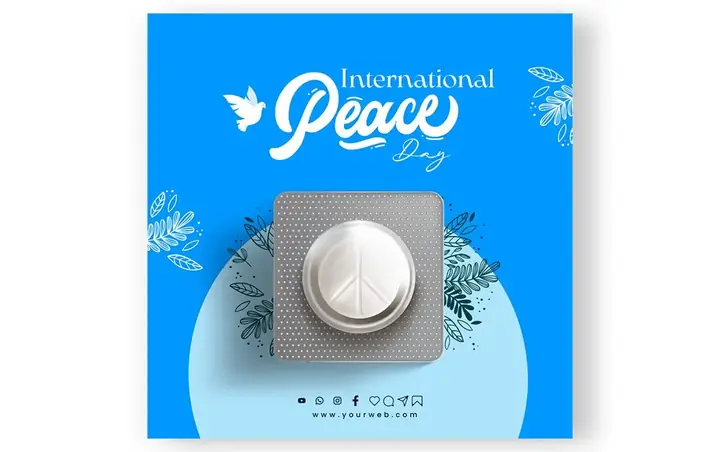
A sky blue International Day of Peace post with a white pill marked with a peace sign in a blister pack, a dove and leaves around the title. Social icons and a website sit in the footer.
What's in the design
- International Peace Day script
- Peace sign pill in blister
- Dove icon
- Leaf decorations
- Footer icons
Who it suits
NGOs, schools, colleges, hospitals, government offices, brands and pages posting awareness messages on special days.
How to customise it
- Extract the RAR file and open the PSD in Adobe Photoshop.
- Edit the headline and the short message.
- Add your organisation's name and logo, or remove the footer.
- Check facts and numbers before posting.
- Export as JPG at 1080 px for Instagram, Facebook and WhatsApp.
File details
- File type: Layered PSD (Adobe Photoshop), packed as RAR
- Preview size: 1080 × 678 px
- Download size: 3 MB
- Includes: PSD file and a preview image
Download this PSD
Free download. Layered Photoshop file. Please read the license before you use it.
Download now (3 MB)Prompt kit for this template
Copy these into ChatGPT, Gemini, Claude, Midjourney or Adobe Firefly to make matching backgrounds and text for your own version.
AI image prompts for backgrounds and variations
Main imageWhite pill with a peace symbol in a blister pack on a sky blue background with leaves, no text, no logos
Background ideaDark background with a single soft spotlight and subtle texture, empty space for text, no text, no logos
Text prompt to write your headline and offer
Write 5 short awareness headlines (max 6 words) and a 40-word caption for [organisation] about [cause or day]. Clear, respectful, no fear-mongering.
Ready captions for Instagram, Facebook and WhatsApp
EnglishA daily dose of peace. Happy International Day of Peace! 🕊️
Hindi🤝 जागरूक बनें, बदलाव लाएं! — [संस्था]
Questions
How do I open the RAR file?
Use a free tool such as 7-Zip or WinRAR on Windows, or The Unarchiver on Mac. Then open the PSD in Adobe Photoshop.
Get new freebies
New free design files, shared on our channels.
TelegramWhatsApp