 FreePSDHero
Ganesh Chaturthi Interior Design PSD Template - Idol on Sideboard Post
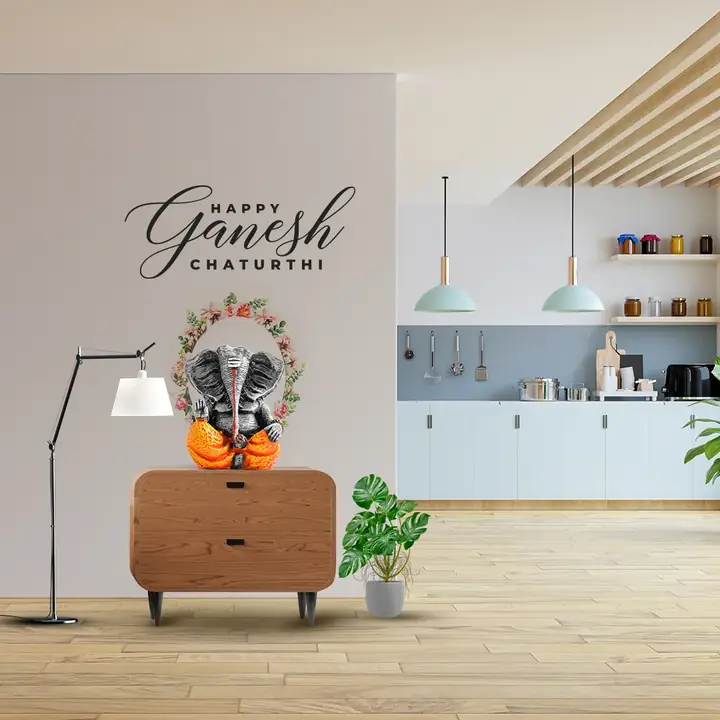
A bright home scene with a Ganesha idol with a flower garland on a wooden sideboard, a lamp and a plant. The script reads 'Happy Ganesh Chaturthi' on the wall.
What's in the design
- Ganesha idol with garland
- Wooden sideboard
- Script greeting
- Kitchen background
Who it suits
Furnishing stores, curtain and blinds shops, interior designers, home decor and mattress showrooms.
How to customise it
- Extract the RAR file and open the PSD in Adobe Photoshop.
- Edit the greeting and the short wish.
- Add your logo, brand name and contact details, or remove them for a personal wish.
- Change colours with the adjustment layers if you want them to match your brand.
- Export as JPG at 1080 px for Instagram, Facebook and WhatsApp.
File details
- File type: Layered PSD (Adobe Photoshop), packed as RAR
- Preview size: 1080 × 1080 px
- Download size: 43 MB
- Includes: PSD file and a preview image
Download this PSD
Free download. Layered Photoshop file. Please read the license before you use it.
Download now (43 MB)Prompt kit for this template
Copy these into ChatGPT, Gemini, Claude, Midjourney or Adobe Firefly to make matching backgrounds and text for your own version.
AI image prompts for backgrounds and variations
Main imageGanesha idol with a flower garland on a wooden sideboard in a bright room, no text, no logos
Background ideaCosy decorated living room with festive lights and soft furnishings, empty space for text, no text
Text prompt to write your headline and offer
Write 5 short festival wishes (max 12 words) for a furnishing store called [name], with a home or comfort twist, plus a caption with 5 hashtags.
Ready captions for Instagram, Facebook and WhatsApp
EnglishHappy Ganesh Chaturthi to you and your family.
Hindi🏠 आपके घर में खुशियां और रौनक बनी रहे। त्योहार की शुभकामनाएं! — [स्टोर]
Questions
How do I open the RAR file?
Use a free tool such as 7-Zip or WinRAR on Windows, or The Unarchiver on Mac. Then open the PSD in Adobe Photoshop.
Get new freebies
New free design files, shared on our channels.
TelegramWhatsApp