 FreePSDHero
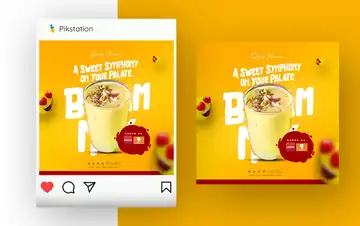
Badam Milk Sweet Symphony Instagram Post PSD Template
Free PSD (4 MB) · Back to template page
Preparing your download
Here's a quick design tip while you wait.
15
Your download button appears when the timer ends. Keep this tab open.
Download PSD (4 MB)
Free for personal and client work. See the license.
You've used today's free download. Sign in with Google to get 5 free downloads every day. We only use your email to count downloads.
- Photoshop shortcutPress Ctrl + J to duplicate a layer before you edit it. If you don't like the change, just delete the copy.
- FontsIf Photoshop says a font is missing, search the font name on Google Fonts. Most free templates use free fonts.
- InstagramExport posts as JPG at 1080 px wide. Bigger files don't look sharper on Instagram, they just upload slower.
- ColourTo change a template's colour in one go, add a Hue/Saturation adjustment layer at the top and drag the Hue slider.
- TextKeep headlines to 6 words or fewer. Most people see your post on a phone for about a second.
- Smart objectsDouble-click a smart object's thumbnail to swap its photo. Save, close, and the new photo fits the same spot.
- PrintingFor print, switch to CMYK (Image > Mode > CMYK Color) and ask your printer how much bleed they need.
- WhatsAppWhatsApp compresses images. Send your design as a document to keep full quality.
After you download
- Extract the file. RAR and ZIP files open with free tools like 7-Zip (Windows) or The Unarchiver (Mac).
- Open the PSD in Adobe Photoshop and edit the text layers.
- Replace photos by double-clicking smart object thumbnails.
- Export as JPG or PNG. The template page has AI prompts and ready captions for this design.