 FreePSDHero
Delivery Customer Testimonial Blue PSD
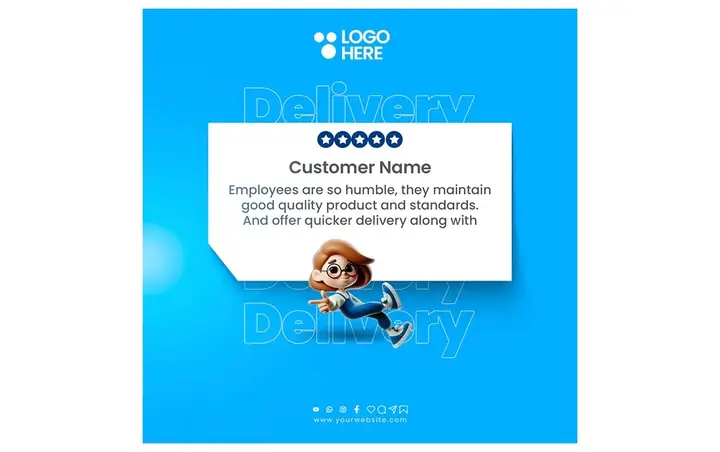
A bright blue post with a white review card, five stars, a customer quote and a cartoon delivery boy running across it.
What's in the design
- Five-star review card
- Cartoon delivery boy
- Big 'Delivery' text
- Logo here
Who it suits
Grocery stores, supermarkets, kirana shops, food and grocery delivery apps, cloud kitchens and quick-commerce startups.
How to customise it
- Extract the RAR file and open the PSD in Adobe Photoshop.
- Replace the logo, app name and phone number with yours.
- Change 'City Name' to the area you deliver to and edit the delivery terms.
- Swap the product and phone screen photos for your own app or store.
- Export as JPG at 1080 px for Instagram and WhatsApp.
File details
- File type: Layered PSD (Adobe Photoshop), packed as RAR
- Preview size: 1080 × 678 px
- Download size: 8 MB
- Includes: PSD file and a preview image
Download this PSD
Free download. Layered Photoshop file. Please read the license before you use it.
Download now (8 MB)Prompt kit for this template
Copy these into ChatGPT, Gemini, Claude, Midjourney or Adobe Firefly to make matching backgrounds and text for your own version.
AI image prompts for backgrounds and variations
Main imageBright blue background with a white card and a cartoon running delivery boy, no text, no logos
Background ideaFresh groceries, vegetables and a delivery scooter on a bright green background, empty space for text, no text, no logos
Text prompt to write your headline and offer
Write 5 short headlines (max 7 words) and a 40-word caption for a grocery delivery service called [name] in [city]. Mention same-day delivery and how to order.
Ready captions for Instagram, Facebook and WhatsApp
English⭐⭐⭐⭐⭐ Thank you for the kind words! — [app]
Hindi🛒 घर बैठे किराना मंगाइए! [नाम] ऐप से ऑर्डर करें, उसी दिन डिलीवरी 🚚
Questions
How do I open the RAR file?
Use a free tool such as 7-Zip or WinRAR on Windows, or The Unarchiver on Mac. Then open the PSD in Adobe Photoshop.
Get new freebies
New free design files, shared on our channels.
TelegramWhatsApp