 FreePSDHero
Cyberpunk Ganesh Chaturthi PSD Poster with Neon Green Lights
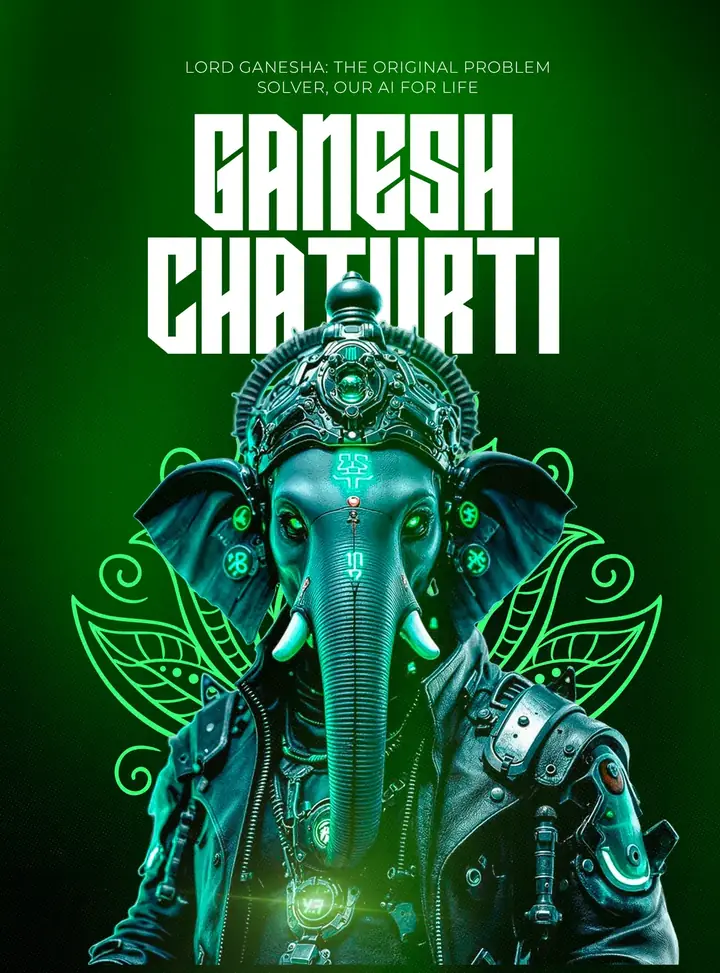
A bold, futuristic poster for tech brands and gamers. Ganesha appears as a cyberpunk figure with a glowing green circuit crown and a leather jacket, under heavy block letters.
What's in the design
- Cyberpunk Ganesha with neon green details
- Huge stencil 'Ganesh Chaturthi' title
- Top line about 'the original problem solver'
- Dark green glowing background
Who it suits
Sweet shops, jewellers, clothing stores, restaurants, housing societies, Ganpati mandals and social media managers who need a greeting for Ganesh Chaturthi or Vinayaka Chaturthi.
How to customise it
- Extract the RAR file and open the PSD in Adobe Photoshop.
- Change the greeting text if you want it in Marathi, Hindi, Kannada or Telugu. Use a font that supports the script, such as Noto Sans Devanagari.
- Replace the footer details with your shop name, number and website, or remove them for a personal wish.
- Add your logo at the bottom. A white or gold version usually looks best.
- Export as JPG for posts and as a 1080 × 1920 crop for WhatsApp status and stories.
Tip: The 'our AI for life' line suits tech companies. Change it to something that fits your audience.
File details
- File type: Layered PSD (Adobe Photoshop), packed as RAR
- Preview size: 2000 × 2704 px
- Download size: 65 MB
- Includes: PSD file and a preview image
Download this PSD
Free download. Layered Photoshop file. Please read the license before you use it.
Download now (65 MB)Prompt kit for this template
Copy these into ChatGPT, Gemini, Claude, Midjourney or Adobe Firefly to make matching backgrounds and text for your own version.
AI image prompts for backgrounds and variations
Text prompt to write your headline and offer
Ready captions for Instagram, Facebook and WhatsApp
Questions
When should I post a Ganesh Chaturthi greeting?
Post it on the morning of the festival, or a day before as a 'coming soon' wish. Mandals often post daily for all ten days, ending with a Visarjan post.
How do I open the RAR file?
Use a free tool such as 7-Zip or WinRAR on Windows, or The Unarchiver on Mac. Then open the PSD in Adobe Photoshop.
Get new freebies
New free design files, shared on our channels.
TelegramWhatsApp